27 vs 32 Inch Monitors: Width, Height and Desk Fit
Compare the physical dimensions of 27 and 32 inch screens, pixel density and viewing space before choosing a monitor.
Compare the visible panel
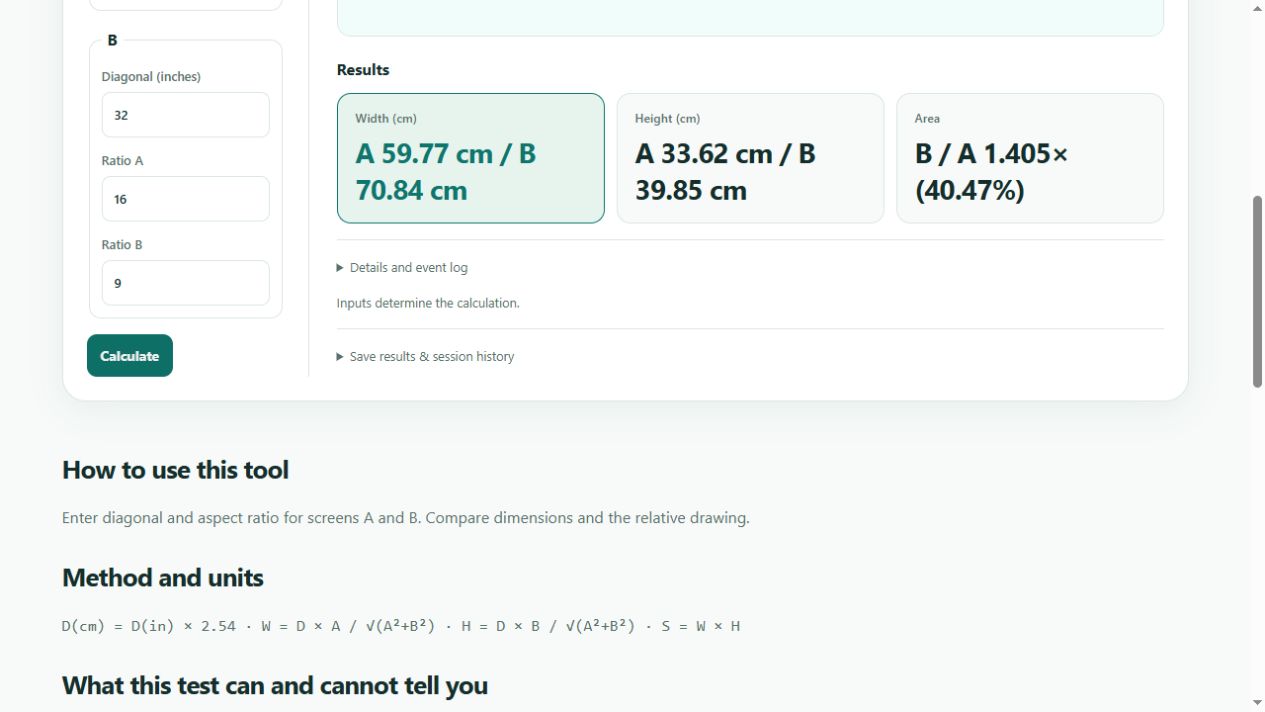
At the same 16:9 aspect ratio, a 27 inch panel is about 59.8 cm wide and 33.6 cm high. A 32 inch panel is about 70.8 cm wide and 39.8 cm high. These are calculated visible rectangles. The cabinet, stand and mounting hardware need additional room. The larger diagonal is about 18.5 percent greater, while visible area grows by about 40.5 percent.
Resolution changes the result
At 2560 by 1440, the approximate pixel density is 108.8 PPI for 27 inches and 91.8 PPI for 32 inches. The larger screen shows larger pixels at the same resolution. At 3840 by 2160, the figures become about 163.2 and 137.7 PPI. Neither number determines a comfortable viewing distance for everybody. Operating system scaling also changes the size of text and controls.
Measure your desk before buying
Mark the panel width on the desk with tape and check the monitor specification for total width and stand depth. Include space for speakers and the keyboard. If you use an arm, check its mounting pattern, weight limit and available adjustment. A diagonal measurement alone does not tell you whether the monitor fits under a shelf.
Make a fair comparison
Use the screen size comparison tool with both diagonals and the correct aspect ratio. Then calculate PPI using each monitor's native resolution. Compare the applications you actually use with similar scaling and brightness. More screen area is useful only when the workspace and text size suit your setup.